How to Create a Futuristic Eye in Photoshop
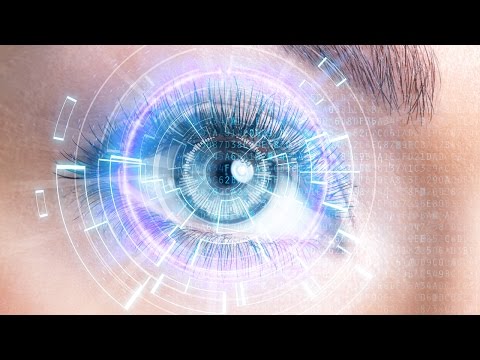
Start by making a new square document. This is very important for the next step! Create any lines or patterns that you would like, keeping in mind that they will soon be spun into a circle. Go to Filter - Distort - Polar Coordinates. Select “Rectangular to Polar” if you want a circle effect. These will be layered over the eye later, so play with different geometric shapes and placements!
For another layer of graphics, we found some cool pictures that resemble sound waves. You can apply the same Polar Coordinate Effect to these images as well! Drag them right onto the image and place them around the eye.
Blending Mode Tips:
If you want only the darks to show up from an image, use the Multiply blend mode.
If you want only the lights to show up from an image, use the Screen blend mode.
Soft light will help graphics blend in to your eye a little better.
Double click on a layer to bring up the Layer Style Dialogue. Select outer glow and make sure the blending mode is on “screen,” Feel free to bring the size and the opacity up, and change the color if you’d like. This will, as the name suggests, give your layer a nice outer glow.
Start by making a new square document. This is very important for the next step! Create any lines or patterns that you would like, keeping in mind that they will soon be spun into a circle. Go to Filter - Distort - Polar Coordinates. Select “Rectangular to Polar” if you want a circle effect. These will be layered over the eye later, so play with different geometric shapes and placements!
For another layer of graphics, we found some cool pictures that resemble sound waves. You can apply the same Polar Coordinate Effect to these images as well! Drag them right onto the image and place them around the eye.
Blending Mode Tips:
If you want only the darks to show up from an image, use the Multiply blend mode.
If you want only the lights to show up from an image, use the Screen blend mode.
Soft light will help graphics blend in to your eye a little better.
Comments
Post a Comment